
Improving WeChat Chatroom Experience
Role
UX Researcher
Timeline
3 months | 2025
Skills
Competitive Analysis, Survey, Interview, Figma, Adobe XD, PS
Product Overview
WeChat is an instant messaging platform with over 1.38 billion monthly active users, integrating messaging, social networking, payments, and mini programs. As a Taiwanese user, I noticed several usability issues in daily use, but were these just my personal frustrations, or broader pain points? This research focused on the chatroom functionality, using mixed methods to identify user pain points and propose design improvements.
Problems

How can we make the line break interaction more intuitive for users?

Is the experience of browsing multiple photos intuitive and smooth?

Do users consider a read receipt feature necessary?

Would a way to pin important messages help users manage active chats more effectively?

Are users experiencing difficulties or frustrations with message synchronization between mobile and desktop devices?
Goal
Usability
This study aims to understand the pain points and challenges users face when using WeChat chat rooms.
Needs
Investigate the features users desire to be added to the platform.
Proposals
Offer specific, feasible design proposals aimed at enhancing the overall user experience.
Research
Competitive analysis
Analyze the functionalities and user experiences of WeChat in comparison with LINE and WhatsApp, aiming to uncover differences and potential opportunities for enhancement.


LINE
Basic Communication Features
Text, Voice, Video Calls, Group Chats, and File Sharing
Social
Moments, Official Accounts, and Channels (Short Videos)
Only Status
User Profile Page and Community Features (Posts and Short Videos)
Stickers and Emotion
Supports Stickers and Emojis
Offers Sticker Functionality with Support for Custom Stickers
Sticker Store (Rich Stickers and Themes)
Pay
Supports money transfers, purchases, and utility bill payments
Only India, Brazil and Singapore
Supports money transfers, purchases, and utility bill payments
Mini Programs
Include various built-in applications, such as shopping, ticket booking, and government services
_
Shopping, Booking airplane ticket, Gifts and News
Business Functions
Official Accounts, Enterprise WeChat, and Advertising Services
WhatsApp Business supports features like auto-replies, quick replies, and displaying business information
LINE Official Account supports advertising, marketing campaigns, and promotional activities
Privacy
It offers end-to-end encryption, but it may be subject to monitoring and censorship in mainland China
Full end-to-end encryption, using the Signal protocol
Offers “Letter Sealing” end-to-end encryption, enabled by default.
Survey
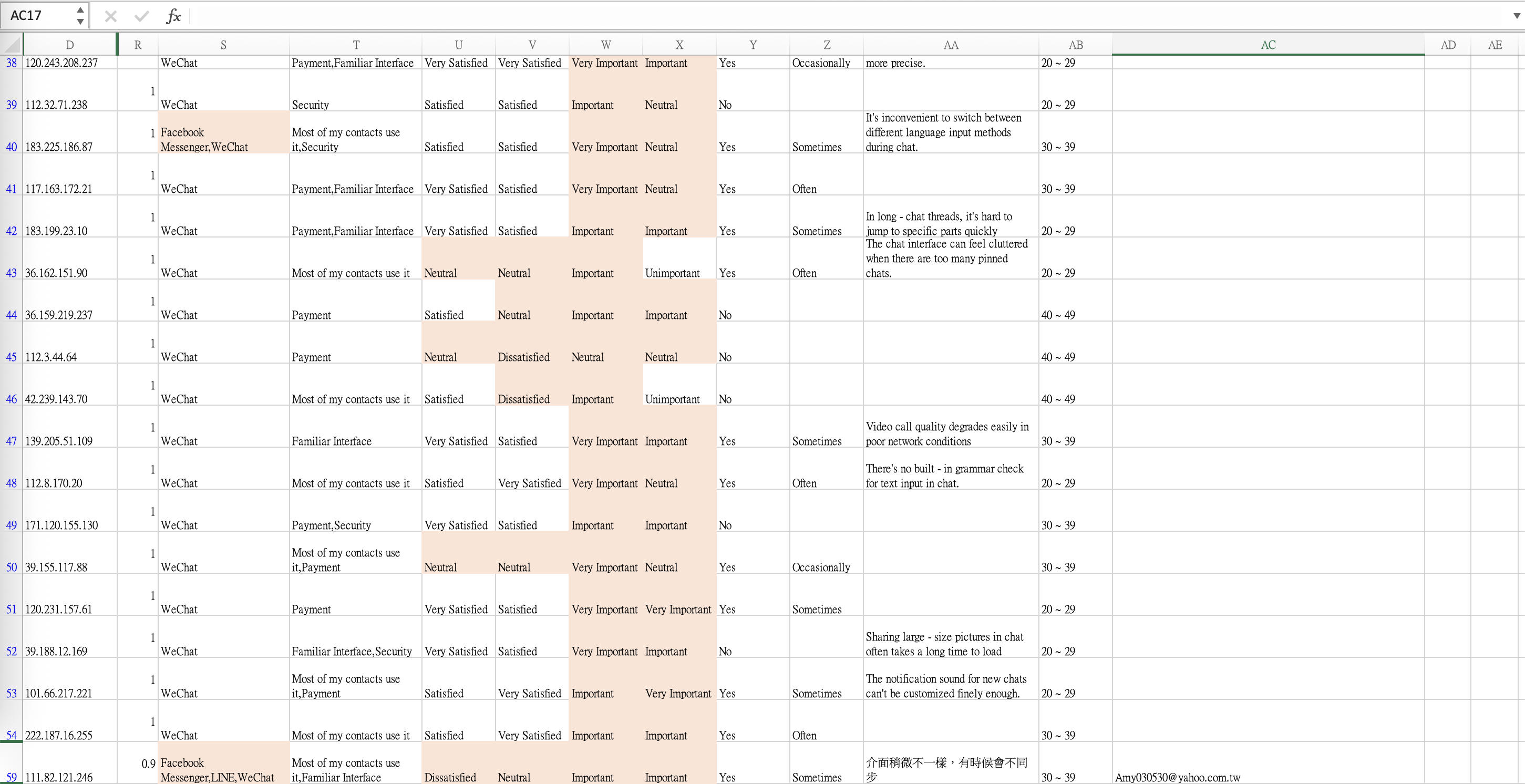
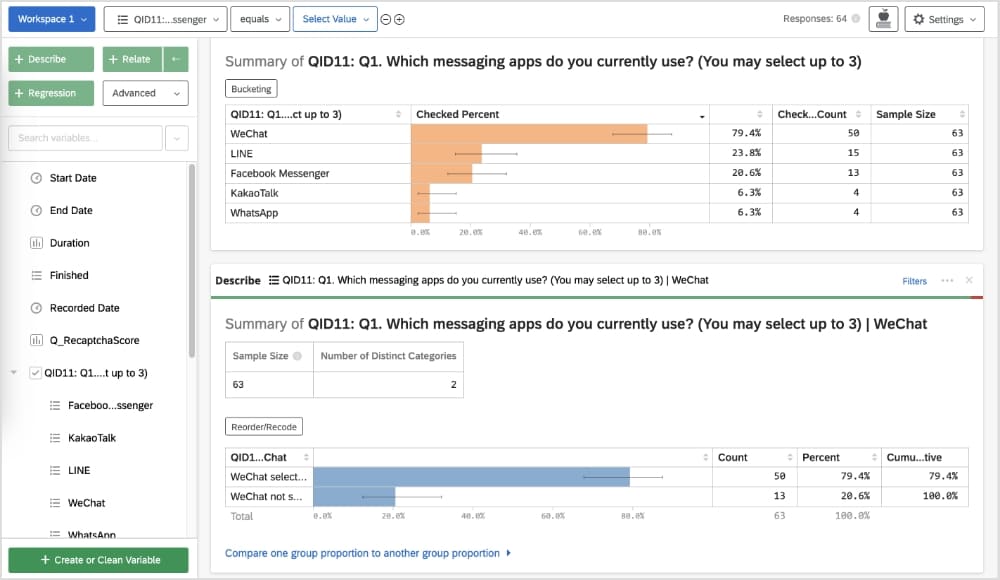
A total of 74 questionnaires were collected, with 57 deemed valid and 44 responses directly related to the research objectives. The study mainly focuses on users’ satisfaction and demands concerning chat room functionalities.
Objective of the Survey
To understand users’ satisfaction levels and latent needs related to the functionalities of WeChat chat rooms.
Survey Refinement Process
The questionnaire was revised through three rounds of refinement to eliminate ambiguous wording and double-barreled questions, and to strengthen alignment with the research questions.
Survey Methodology Design
The questionnaire was administered through Qualtrics and consisted of 10 questions in total. Question types included multiple-choice, Likert scale questions, and open-ended questions. Logic branching was incorporated to enhance the accuracy of the collected data. (Survey Link)
Participant Information
The survey was distributed via social media platforms and university-related communities. A total of 74 responses were collected. Among them, 44 participants identified as WeChat users and were included in the main analysis. In terms of age distribution, 86% of respondents were between 20 and 39 years old, representing the core user demographic.
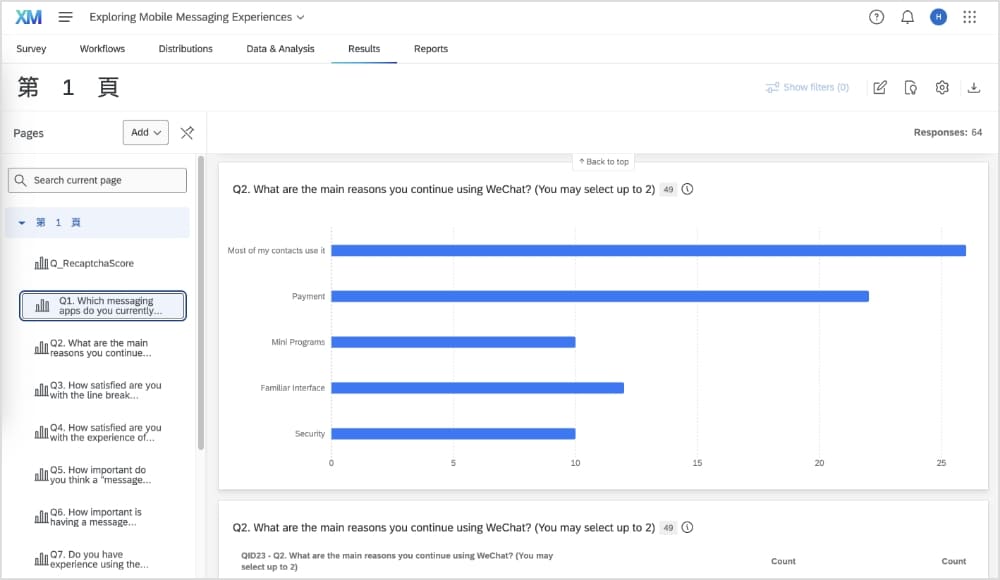
Survey Results
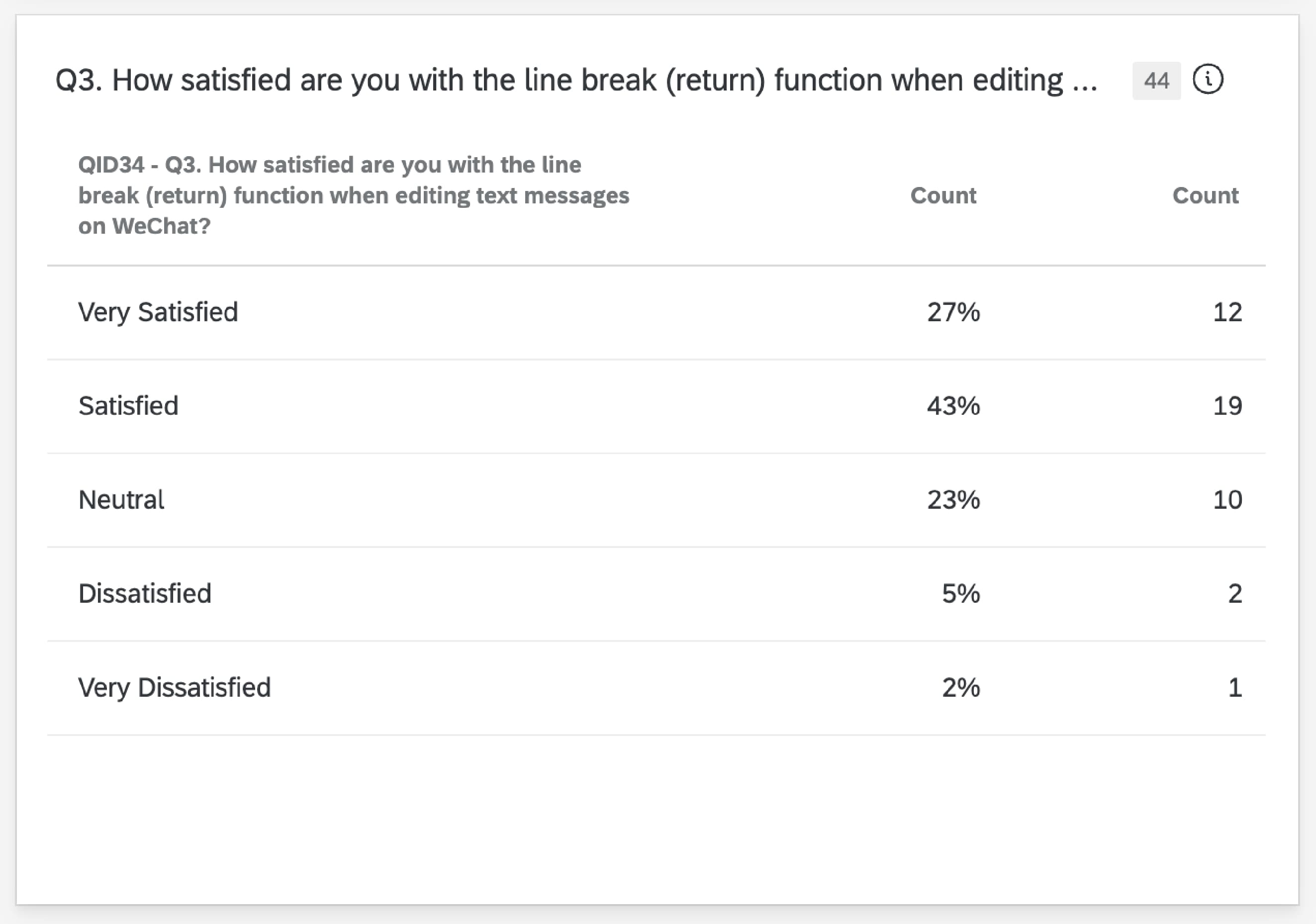
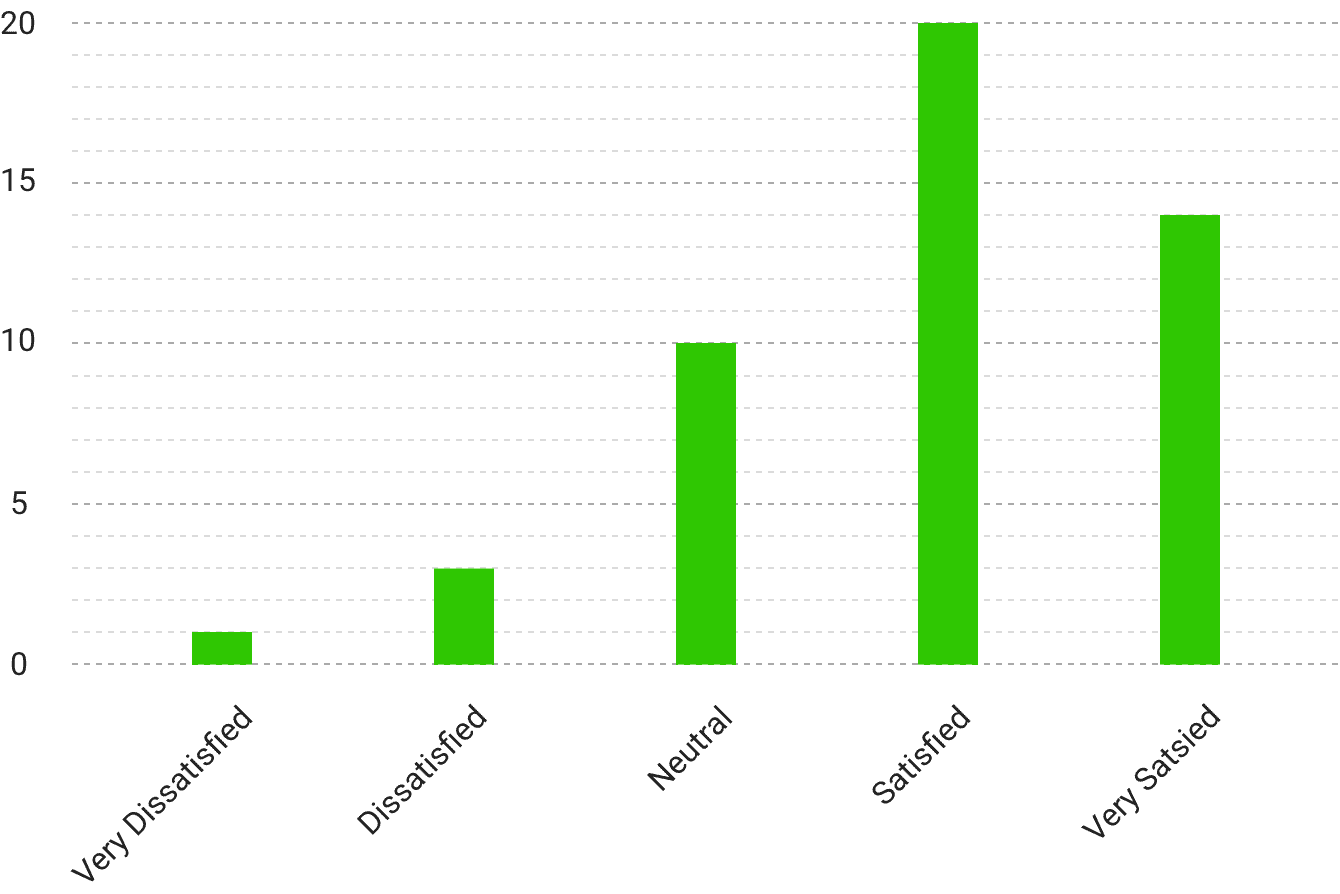
Q. How satisfied are you with the line break (return) function when editing text messages on WeChat?
Line Break: May Not Be Intuitive Enough
Users must long-press the screen to insert a line break. This interaction lacks visual discoverability and causes disruption in message flow. 70% of users gave positive scores to the current line break function, while 23% remained neutral and 7% reported dissatisfaction. Although the majority of users reported satisfaction, the remaining responses suggest there may still be room for improvement in the interface design and user flow, particularly for users who have not discovered this gesture.
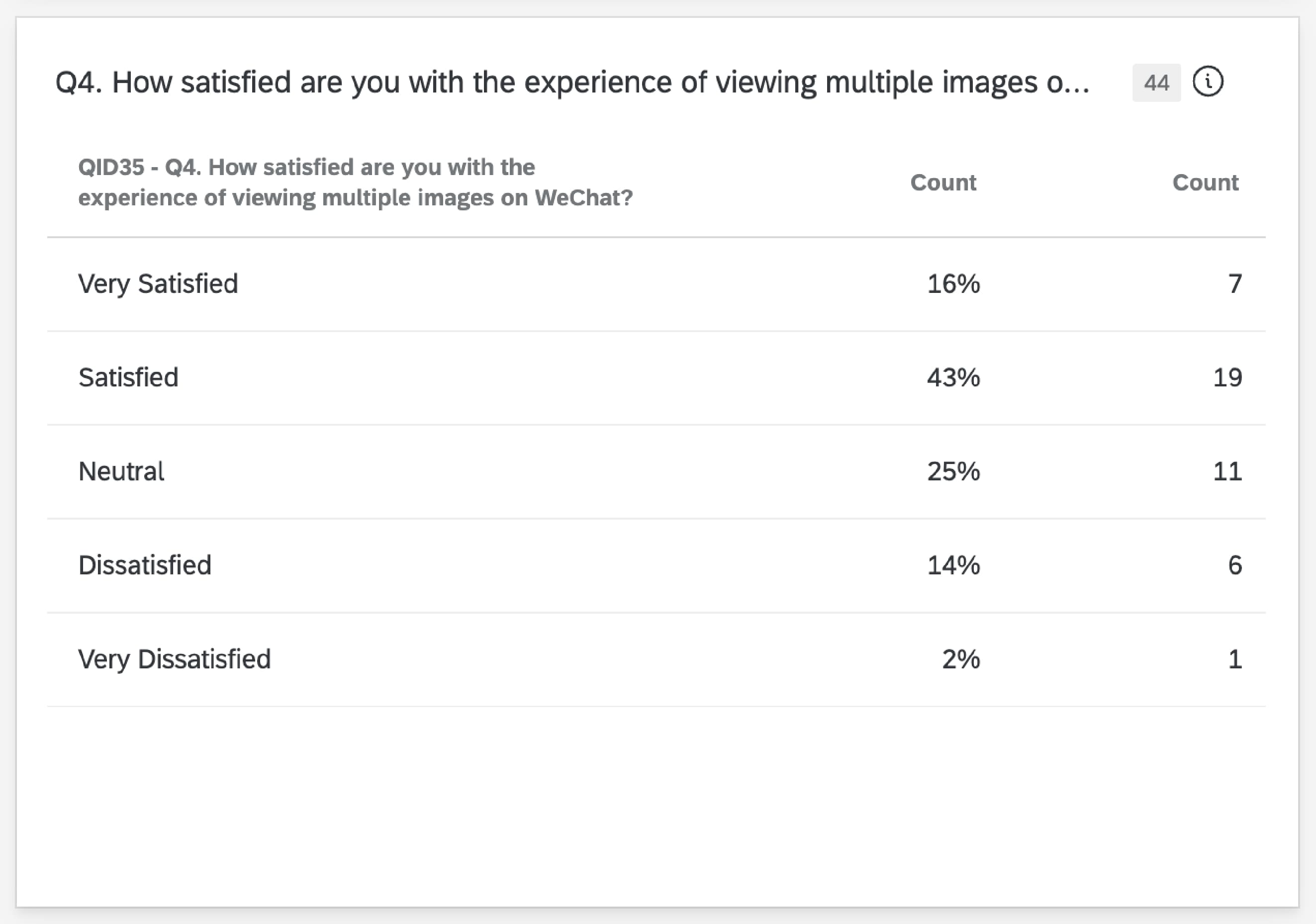
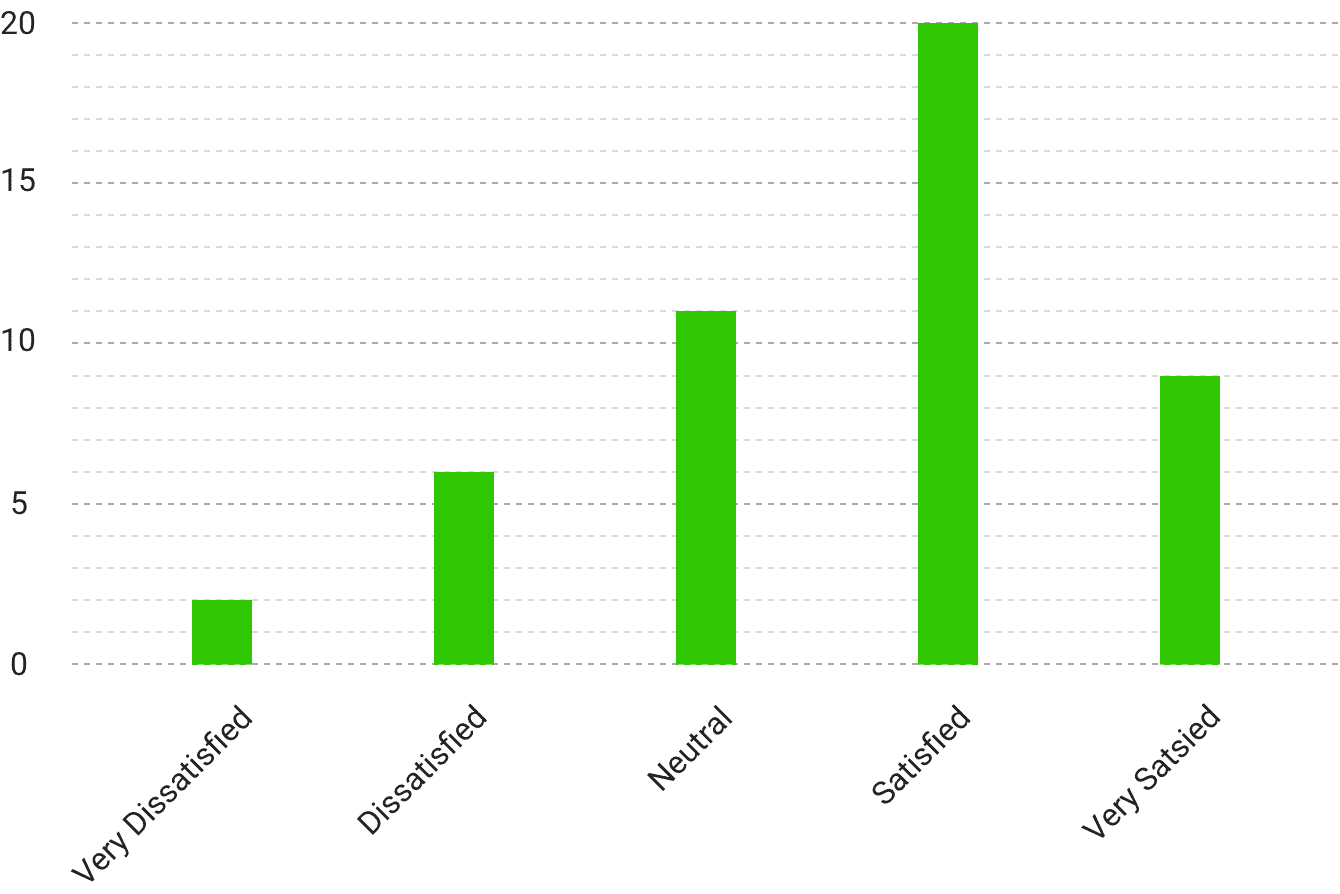
Q. How satisfied are you with the experience of viewing multiple images on WeChat?
Viewing Multiple Images: Disjointed Experience
When sending multiple images, WeChat displays them one-by-one. Makes chat history harder to read and manage. 59% of users gave positive scores to the current multi-image viewing experience, while 25% remained neutral and 16% reported dissatisfaction.
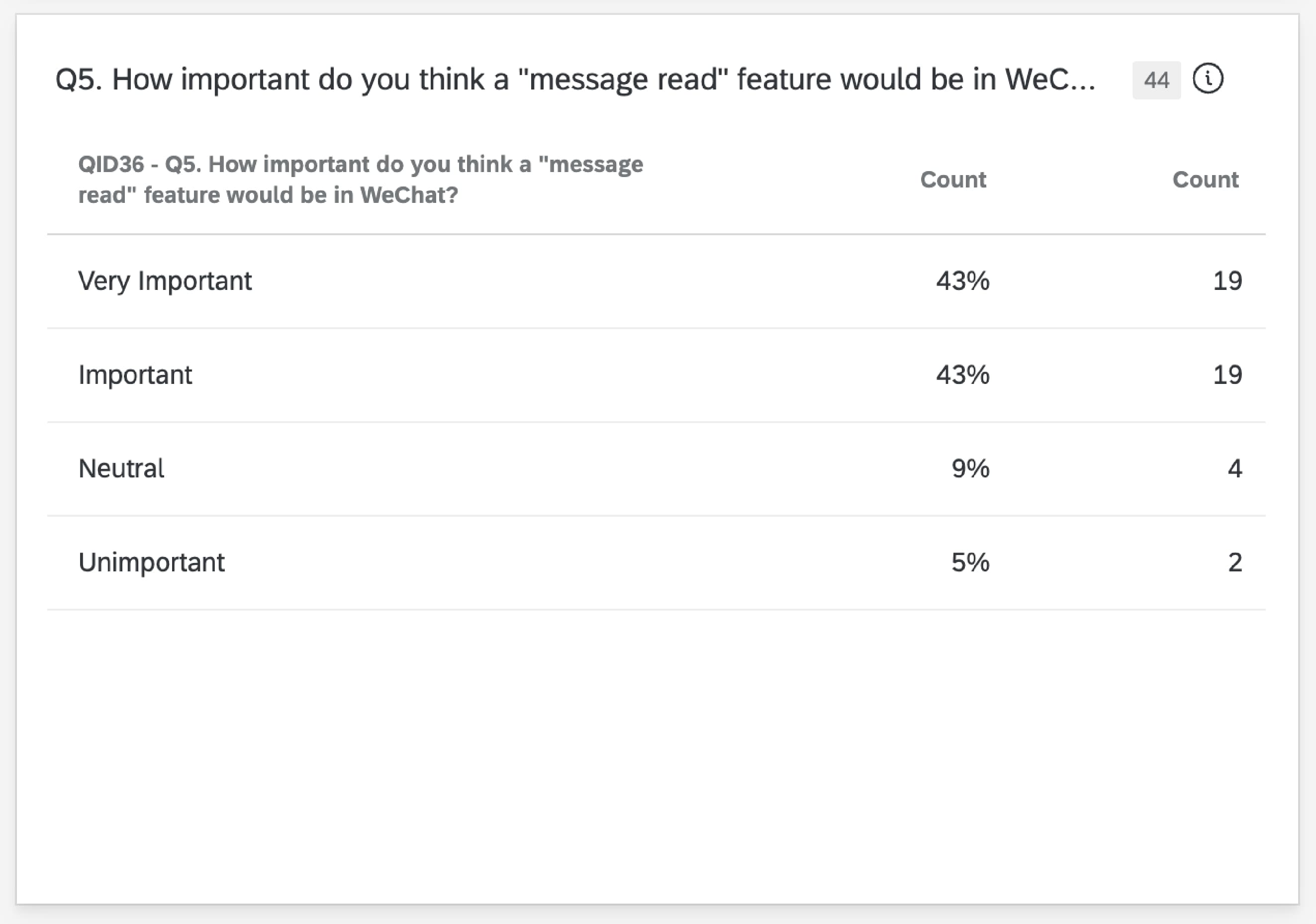
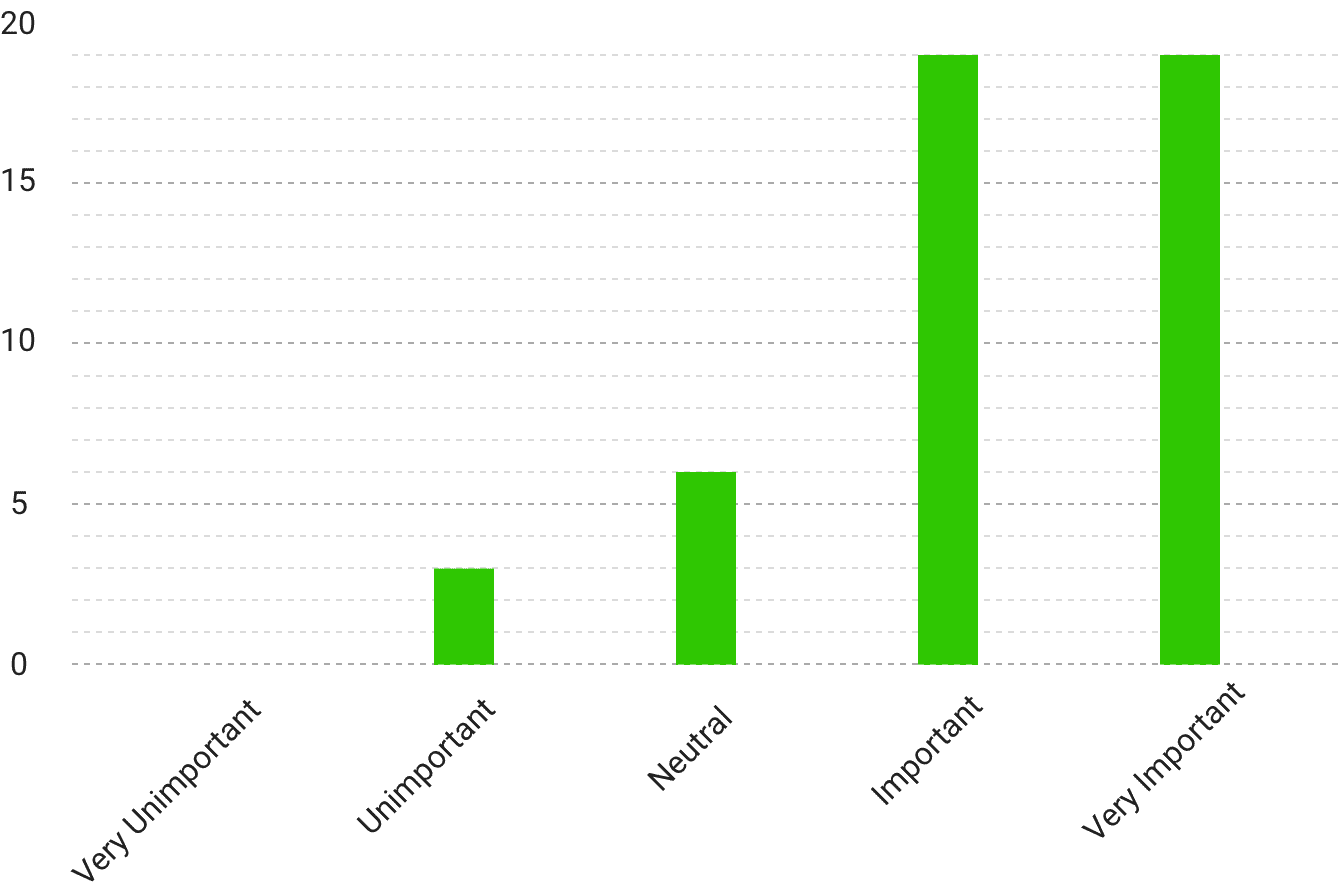
Q. How important do you think a “message read” feature would be in WeChat?
Lack of Read Receipt Feature
Users cannot know if the recipient has read their messages. Leads to uncertainty, especially in group or urgent chats. 86% of users rated a read receipt feature as “Important” or “Very Important.” This shows a clear gap between user expectations and current app features.
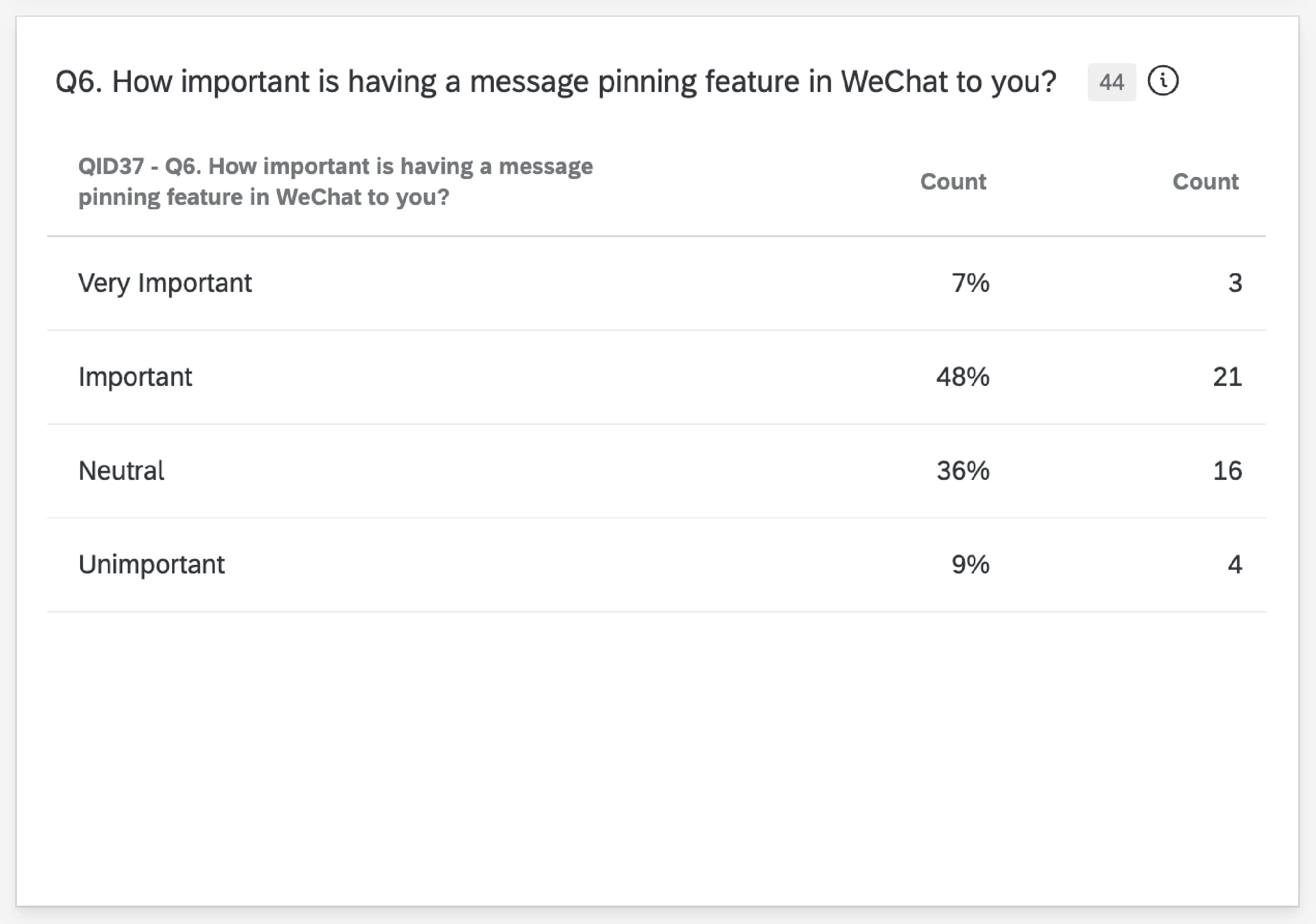
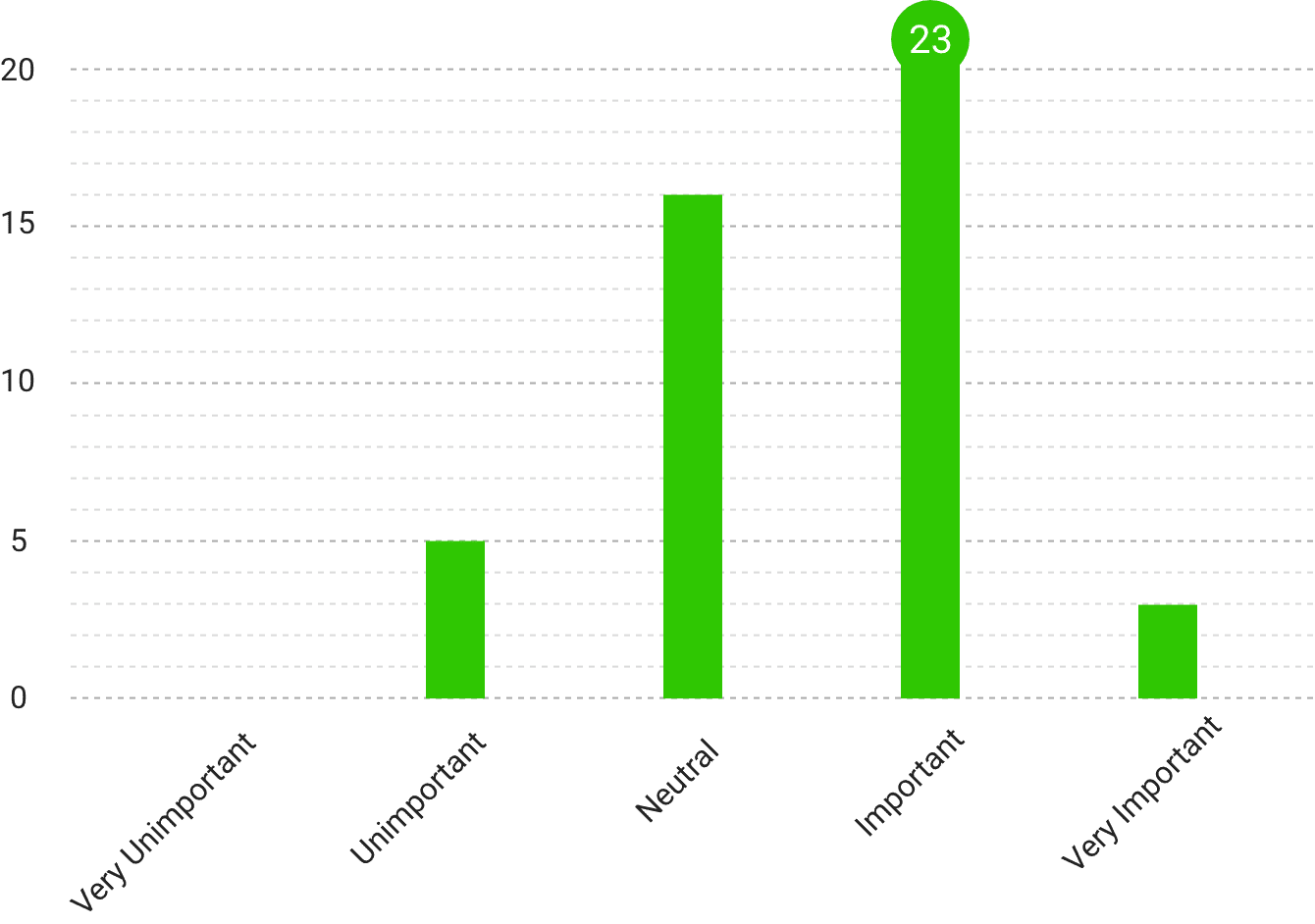
Q. How important is having a message pinning feature in WeChat to you?
Message Pinning: An Unmet Need
WeChat does not currently offer a way to pin important messages within a chat. Important messages get buried in active group chats. Regarding message pinning, 55% of participants considered it very important or important, indicating that this is a new feature worth adding.
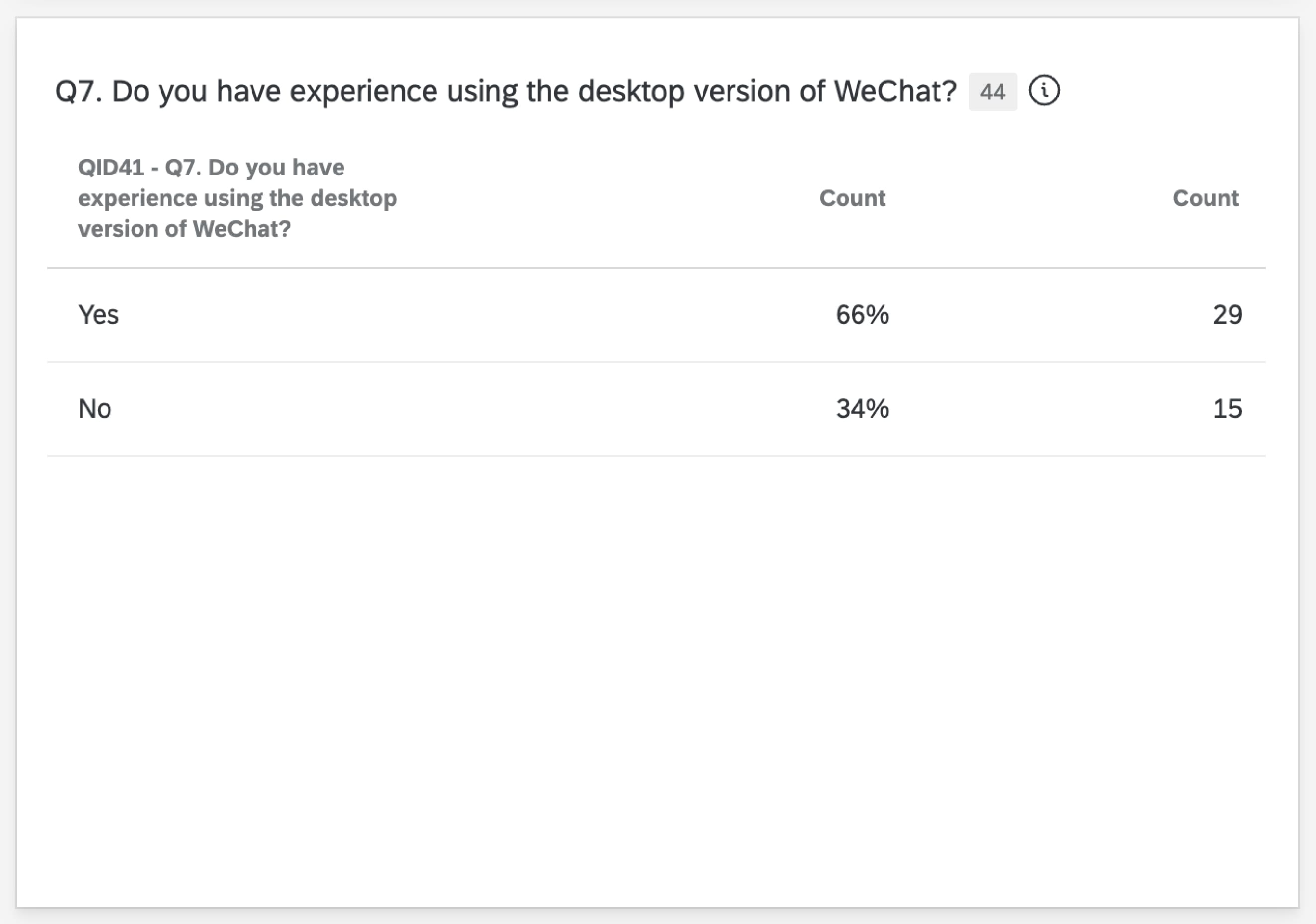
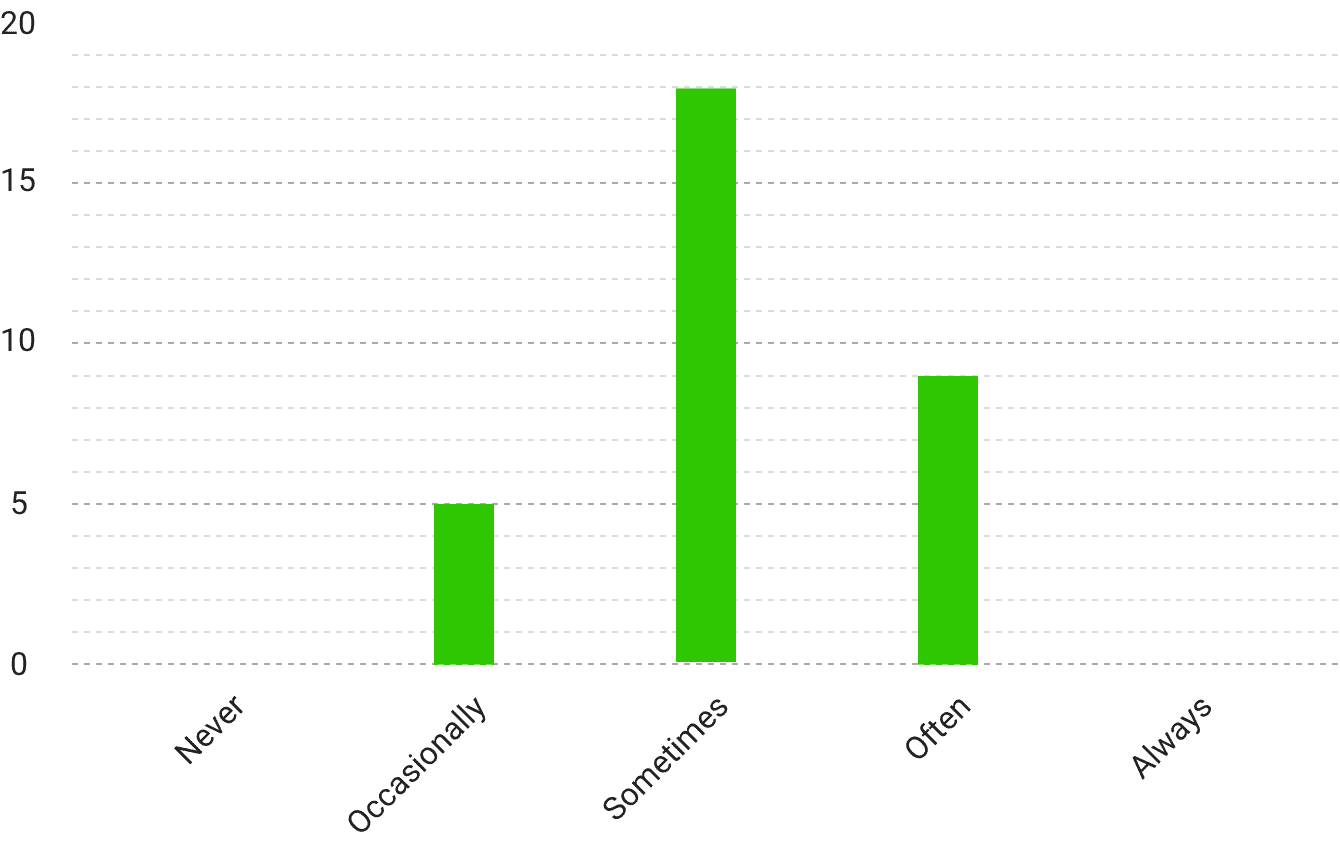
Q. How often do you experience message sync issues between the desktop and mobile versions?
Cross-Device Sync: A Repeated Friction Point
Messages between desktop and mobile versions are not fully synchronized. Users report having to check phones to see complete histories. 53% of desktop users said they sometimes encounter sync issues; another 26% said they often do. Several users stated they had to rely on their phones to access the complete message history. This persistent problem negatively affects users who frequently switch devices—especially professionals.
User Interviews
We conducted interviews with four users, including participants from China and Taiwan, to gain an in-depth understanding of their real-life usage contexts and perceptions.

Ray
CN | 34 yr. | 10+ yrs exp

Guo
CN | 23 yr. | 10+ yrs exp

Morgen
TW | 30 yr. | 5 yrs exp

Claire
TW | 29 yr. | 3 yrs exp
Line Break is Unintuitive
Though 70% rated it positively, interview feedback revealed confusion around the hidden long-press interaction. Root cause analysis showed a mental model mismatch: users expect Enter to create line breaks based on their experience with other messaging apps and computer typing, but WeChat uses it to send messages. Users have "gotten used to" this design, but interview participants still described accidental sends and cognitive friction, a pattern the survey's 70% positive rating does not fully capture.
Multi-image View is Disorganized
2 out of 4 participants explicitly mentioned that images are displayed one-by-one in the chat history, which participants found “hard to browse” or “too long to view.”
Mixed Opinions on Read Receipt
2 participants said they don't need it. 2 others (especially Claire) wish this feature existed, referencing other apps like LINE or WhatsApp.
Cross-Device Syncing Issues
Only 1 participant encountered regular syncing issues. Others had no strong opinion, but survey data shows broader concern.
Other Insights
Voice messages can’t be fast-forwarded → inconvenient. Moments UI is unintuitive: long-pressing camera for text-only post is hard to discover. Sticker quality was criticized as “ugly” and lacking variety.
Findings
Line break interaction is unintuitive.
Though 70% rated it positively, interview feedback revealed confusion around the hidden long-press interaction.
Multi-image display lacks grouping.
16% of users reported dissatisfaction and 25% remained neutral, and 2 of 4 interviewees described browsing as time-consuming.
High demand for read receipts.
86% consider it important or very important. One interviewee expressed desire to match features from other apps.
Strong latent demand for message pinning.
55% of participants considered it important or very important, indicating that this is a feature worth adding.
Messages are not synced across devices.
All 34 surveyed desktop users reported experiencing sync issues at some frequency, though only 1 of the 4 interviewees described it as a regular problem.
Recommendations
The recommendations below are ordered by priority, based on unmet user need, frequency of occurrence, and design feasibility. The cross-device sync issue identified above is not addressed here, as it points to an underlying data synchronization problem rather than an interface-level gap, and would require further technical investigation before any fix could be scoped.
Add optional “Read Receipt” toggle
Survey shows that 86% of users want this feature. It is recommended to provide a toggle option, allowing users to decide whether to display read receipts for individual or group chats based on their preferences. This brings WeChat closer to LINE and WhatsApp, both of which already display message read status.
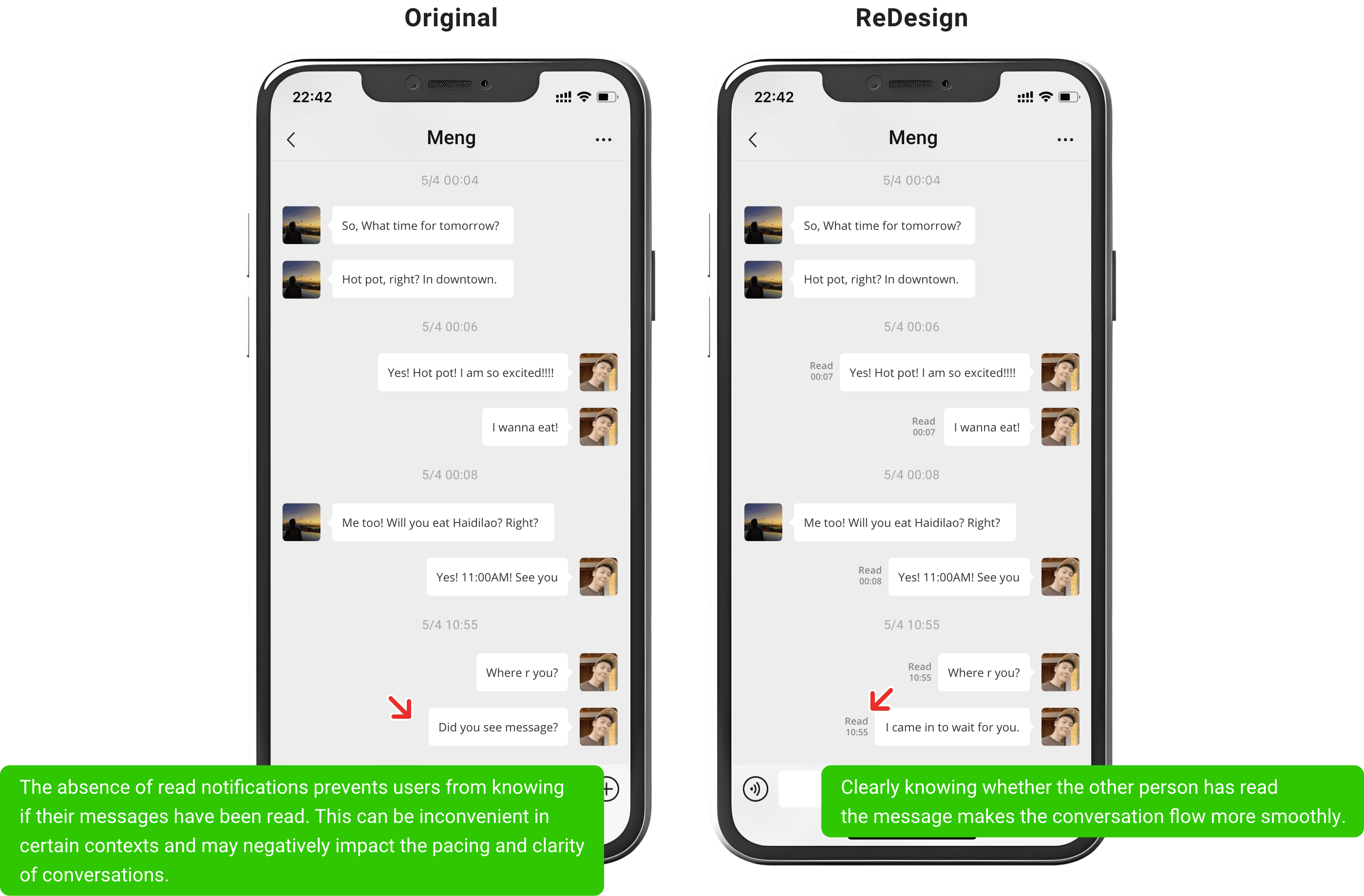
Balance privacy and communication transparency to enhance user control.
Add a message pinning feature
While 55% of users found this feature important, it is recommended to include a “Pin” option in the long-press message menu, along with guidance cues such as a tutorial for new users or tooltip prompts. WhatsApp introduced in-chat message pinning in 2023 and later expanded it to support multiple pinned messages, validating this as a feature users expect from a modern messaging platform.
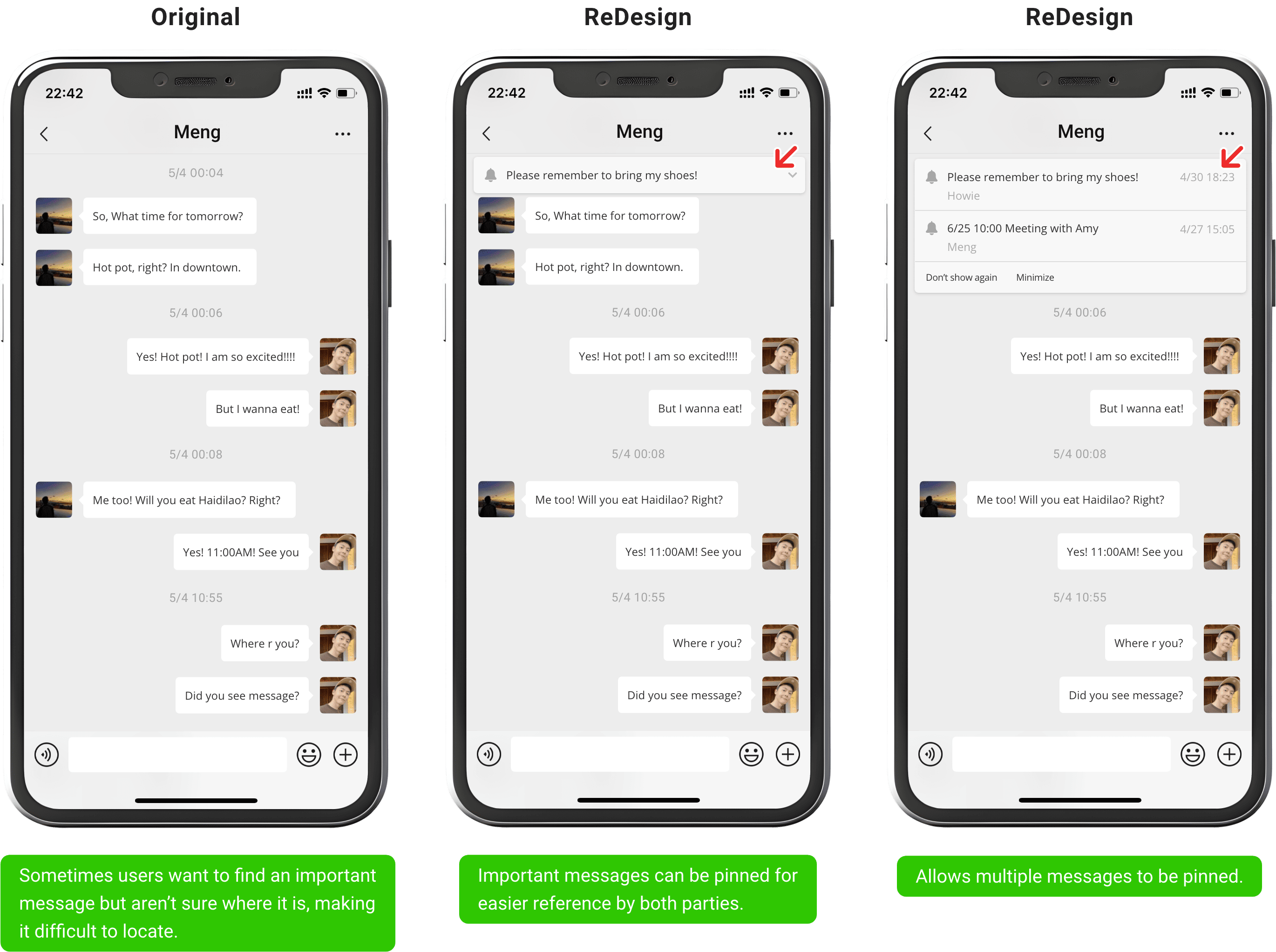
Enable quick access to important messages.
Group multiple images into a gallery view
Allowing multiple images to be displayed as a grouped set—either through swipe navigation or a grid view—can enhance visual organization and make it easier for users to review past content efficiently.
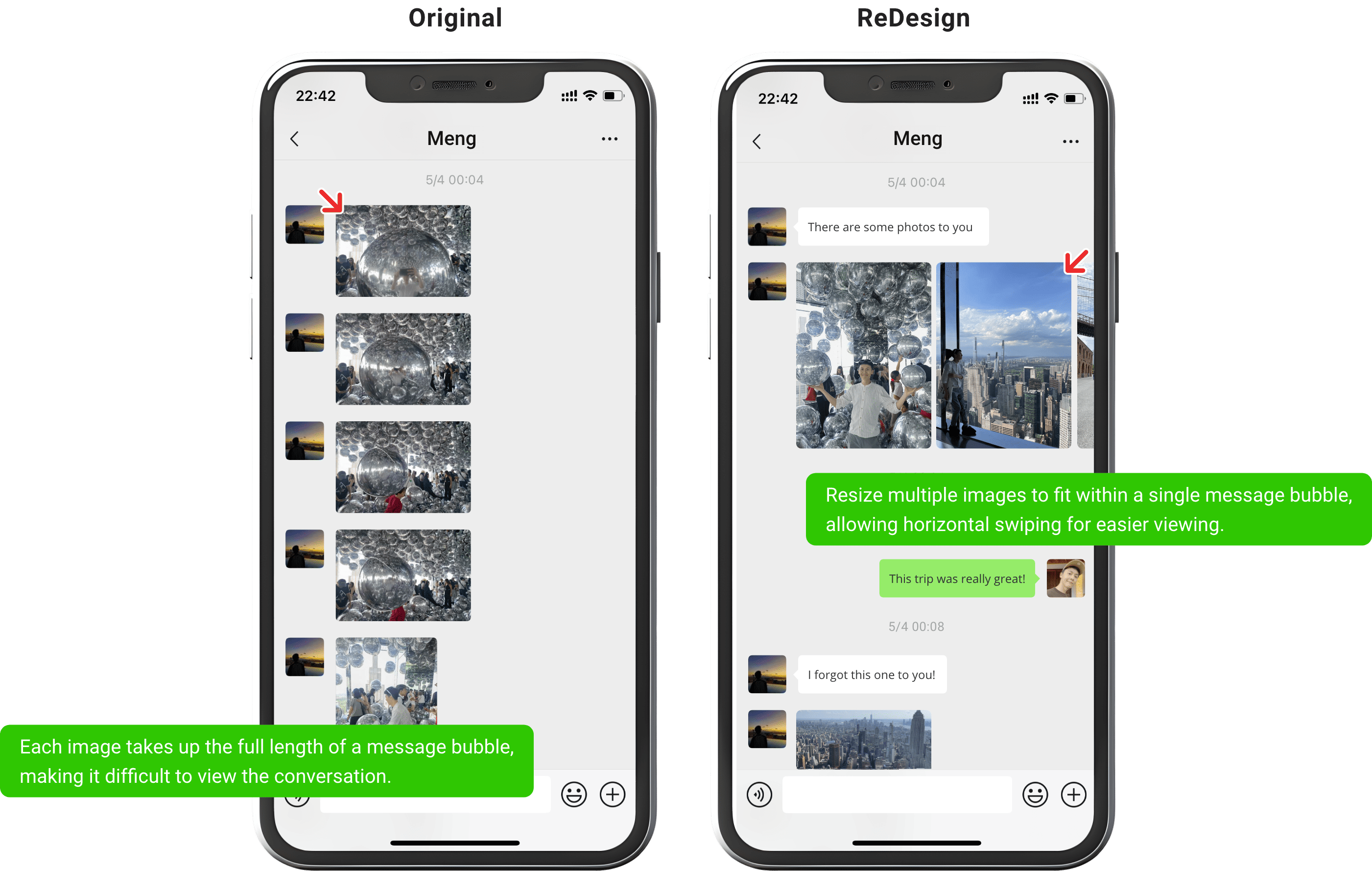
Enhance the user experience of viewing messages.
Add a line break button in virtual keyboard
Currently, users must long-press to insert a line break, which several interviewees described as unintuitive. It is recommended to add a clearly visible line break button—either above the virtual keyboard or next to the input field—to reduce the learning curve and improve typing efficiency.
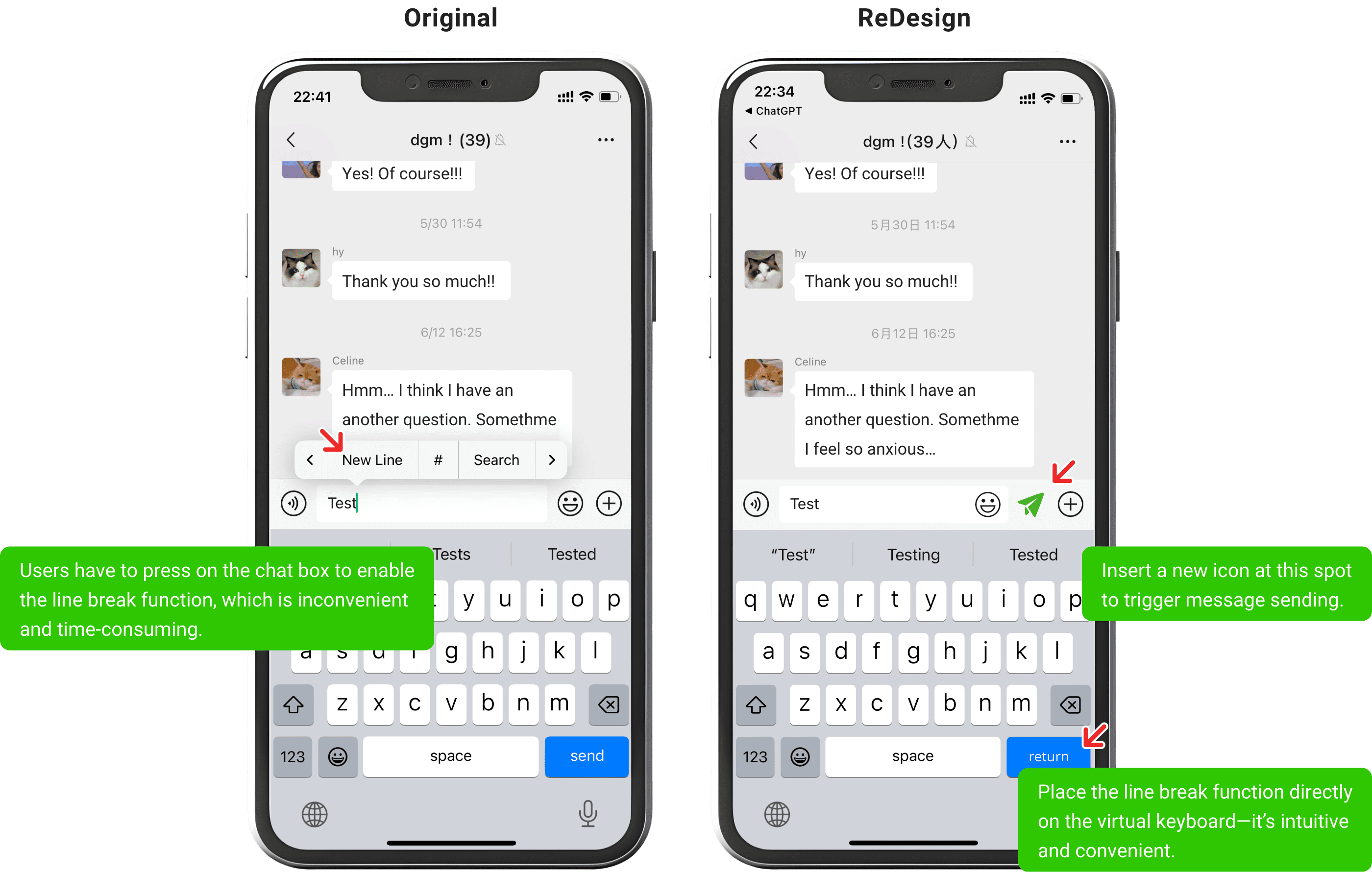
This is especially helpful for users who have not discovered the hidden gesture, as it reduces the likelihood of accidentally sending messages.
Reflection
This was the first user research project I completed independently end to end, from survey design and interviews to synthesis and analysis. Writing clear, unbiased questions that matched users' own language was harder than expected, and interviewing taught me how to manage pacing and ask the follow-up question that gets past a surface-level opinion to the real motivation underneath.
I often worried my own perspective was too narrow, so I cross-checked interview observations against survey data before treating them as findings. For example, only one interviewee described the cross-device sync issue as a regular problem, but the survey showed it was nearly universal among desktop users, a gap that pushed me to look more carefully at how a small qualitative sample and a larger quantitative one can tell different stories. That process taught me that meaningful insights come from validation, not sudden inspiration.
The clearest lesson was that a product people use every day is not the same as a product that serves them well. Users kept describing small workarounds they had quietly learned to live with, which reminded me that retention and engagement numbers can hide real friction. Good design means finding and addressing that friction, not just presenting a creative idea.